auth_basic is a lousy protection for your websites. Better use en SSO solution like Authentik. Here is my NGINX reverse proxy host configuration:
server {
    server_name HOST.DOMAIN.NAME;
    access_log /var/log/nginx/HOST.DOMAIN.NAME.access.log;
    error_log /var/log/nginx/HOST.DOMAIN.NAME.error.log;

    # Increase buffer size for large headers from Authentik
    proxy_buffers 8 16k;
    proxy_buffer_size 32k;

    # All requests to /outpost.goauthentik.io must be accessible without authentication
    location /outpost.goauthentik.io {
        # When using the embedded outpost, proxy to Authentik backend
        proxy_pass http://AUTHENTIK_IP:9000/outpost.goauthentik.io;

        # CRITICAL: Set Host to auth.DOMAIN.NAME so Authentik knows which provider to use
        proxy_set_header Host auth.DOMAIN.NAME;

        proxy_set_header X-Original-URL $scheme://$http_host$request_uri;
        add_header Set-Cookie $auth_cookie;
        auth_request_set $auth_cookie $upstream_http_set_cookie;
        proxy_pass_request_body off;
        proxy_set_header Content-Length "";
    }

    # Special location for when the /auth endpoint returns a 401
    # For domain level, redirect to your authentik server with the full redirect path
    location @goauthentik_proxy_signin {
        internal;
        add_header Set-Cookie $auth_cookie;
        # CHANGED: Use full auth.DOMAIN.NAME URL for domain-level auth
        return 302 https://auth.DOMAIN.NAME/outpost.goauthentik.io/start?rd=$scheme://$http_host$request_uri;
    }

    location / {
        # -------------------------
        # BYPASS AUTH FOR LOCAL IPS
        # -------------------------
        satisfy any;
        allow 192.168.1.0/24;
        deny all;

        ##############################
        # authentik-specific config
        ##############################
        auth_request /outpost.goauthentik.io/auth/nginx;
        error_page 401 = @goauthentik_proxy_signin;
        auth_request_set $auth_cookie $upstream_http_set_cookie;
        add_header Set-Cookie $auth_cookie;

        # Translate headers from the outposts back to the actual upstream
        auth_request_set $authentik_username $upstream_http_x_authentik_username;
        auth_request_set $authentik_groups $upstream_http_x_authentik_groups;
        auth_request_set $authentik_entitlements $upstream_http_x_authentik_entitlements;
        auth_request_set $authentik_email $upstream_http_x_authentik_email;
        auth_request_set $authentik_name $upstream_http_x_authentik_name;
        auth_request_set $authentik_uid $upstream_http_x_authentik_uid;

        proxy_set_header X-authentik-username $authentik_username;
        proxy_set_header X-authentik-groups $authentik_groups;
        proxy_set_header X-authentik-entitlements $authentik_entitlements;
        proxy_set_header X-authentik-email $authentik_email;
        proxy_set_header X-authentik-name $authentik_name;
        proxy_set_header X-authentik-uid $authentik_uid;

        # Your original proxy settings to Homer
        proxy_set_header X-Real-IP $remote_addr;
        proxy_set_header X-Forwarded-For $proxy_add_x_forwarded_for;
        proxy_set_header Host $host;

        # Support for websocket
        proxy_set_header Upgrade $http_upgrade;
        proxy_set_header Connection "upgrade";

        proxy_pass http://AUTHENTIK_IP:8090;
     }

    listen 443 ssl;
    ssl_certificate /etc/letsencrypt/live/HOST.DOMAIN.NAME/fullchain.pem;
    ssl_certificate_key /etc/letsencrypt/live/HOST.DOMAIN.NAME/privkey.pem;
    include /etc/letsencrypt/options-ssl-nginx.conf;
    ssl_dhparam /etc/letsencrypt/ssl-dhparams.pem;
}

server {
    if ($host = HOST.DOMAIN.NAME) {
        return 301 https://$host$request_uri;
    }
    listen 80;
    server_name HOST.DOMAIN.NAME;
    return 404;
}
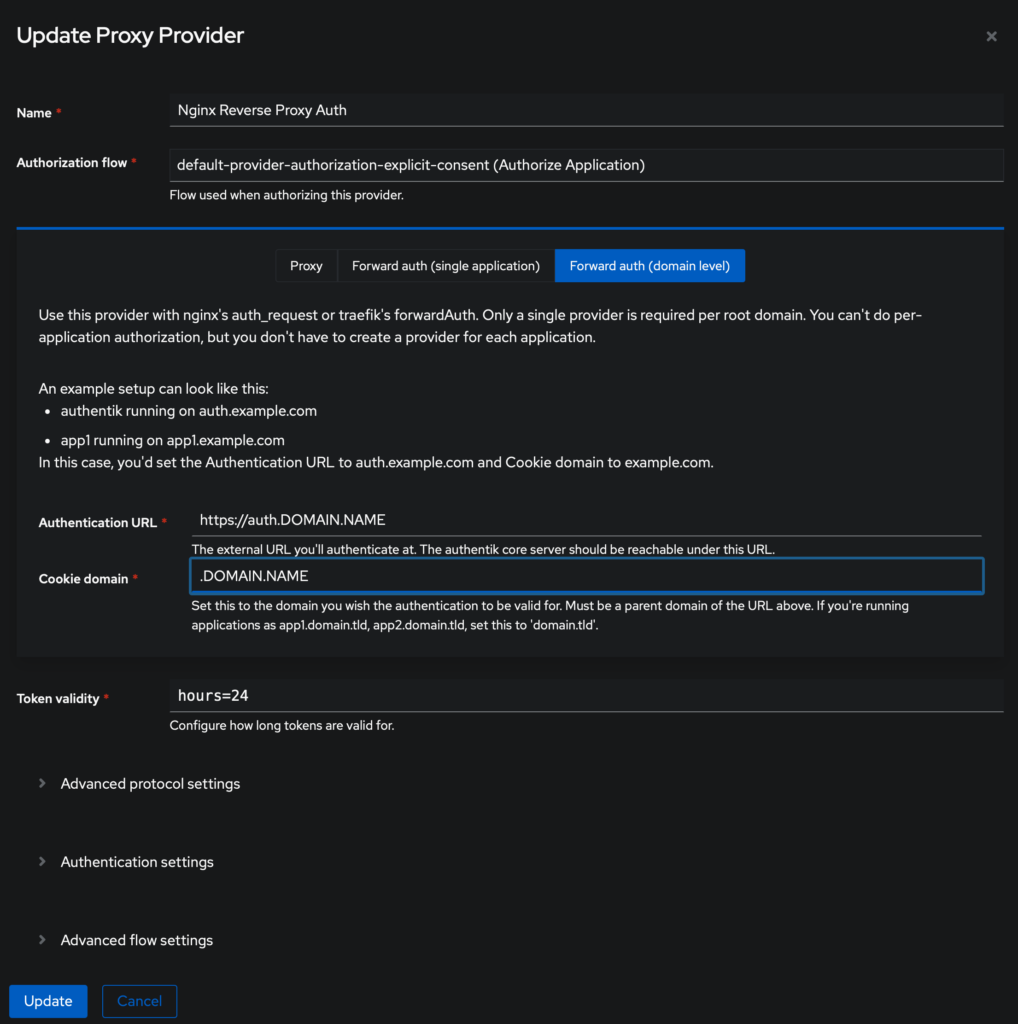
In Authentik, you have to create a Provider:
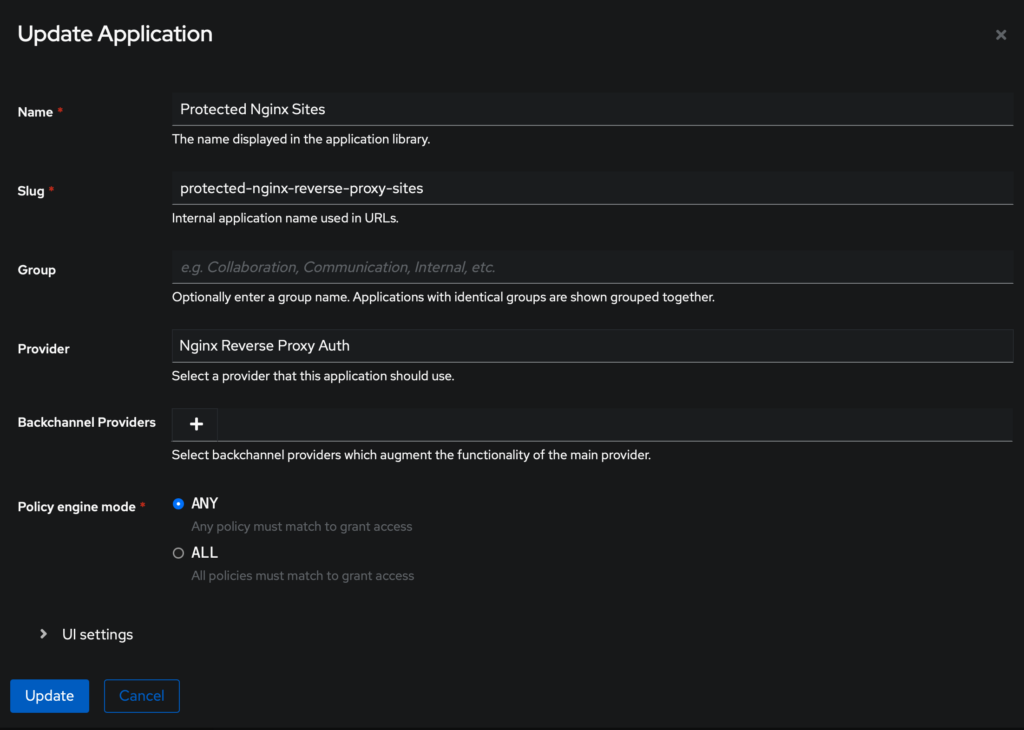
In Authentik, create an Application: